
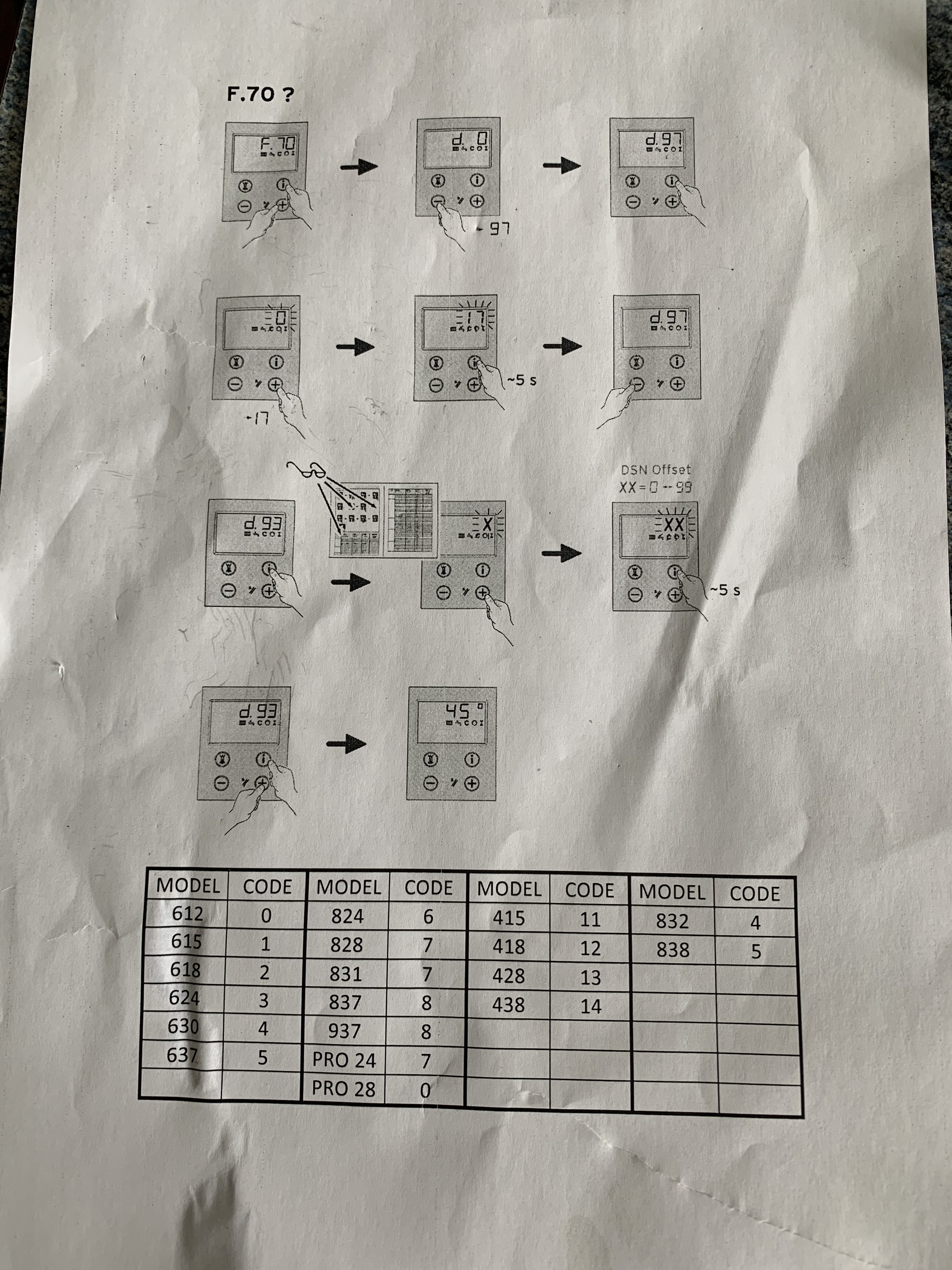
Programming or re-addressing a Vaillant PCB (Printed Circuit Board) is sometimes necessary after replacing a board on older Vaillant ecoTEC boilers, particularly units manufactured before 2015. These models use a manual parameter-entry system, which means the engineer must select the correct boiler code to ensure safe and efficient operation.
Below is a clear, engineer-focused guide explaining how to access diagnostic mode, enter DSN (Device Serial Number) settings, and program the correct model type.
When Do You Need to Program the PCB?
You will usually need to program or reprogram a Vaillant PCB when:
- A new or refurbished PCB has been installed
- The boiler is displaying the F.70 fault code (model mismatch)
- The boiler is operating incorrectly after a board change
- Components such as the gas valve or fan are not modulating correctly
- Hot water or heating output is incorrect due to wrong model identification
The F.70 error is the main symptom of an unconfigured or incorrectly programmed PCB.
Step-by-Step Guide: Programming Vaillant PCB (Pre-2015 Models)
1. Start With Error F.70 (If Displayed)
If the display shows F.70, this confirms the PCB is unprogrammed.
Press and hold the two right-hand buttons together to enter diagnostic mode.
2. Enter the Diagnosis Menu – d.0
Use the arrow buttons to navigate to d.0, then press OK to access the menu.
3. Navigate to Parameter d.97
Scroll until you reach d.97 – this parameter allows access to the DSN offset table.
4. Enter DSN Mode
Press and hold the two buttons indicated in Vaillant’s diagram for 5 seconds.
The display will flash and enter DSN mode.
5. DSN Offset Screen (XX = 0–99)
You will now see a two-digit number (XX) representing the model code.
This is where you select the correct boiler type.
6. Select the Correct Model Code
Use + / – to adjust the value according to the model table for your boiler.
Hold OK for 5 seconds to save.
7. Confirmation Code – d.93
The screen will display d.93, confirming that the selected model code is stored.
8. Reboot the Boiler and Check Temperatures
Return to the home screen and ensure the boiler displays temperatures normally.
Your PCB is now successfully programmed.
Pro Tips for Engineers
- Always confirm the boiler model using the rating plate before programming
- Check gas settings and modulating components after programming
- If F.70 remains, the PCB may be faulty or the wrong revision for the boiler
- Pre-2015 Vaillant PCBs do not auto-recognise the boiler type — manual entry is essential
Professional Vaillant PCB Programming & Diagnostics
At Certificates4UK Ltd, we specialise in Vaillant PCB programming, board replacements, and advanced diagnostics across:
- West Molesey
- Kingston
- Richmond
- Wimbledon
- Surrey & London
If your Vaillant boiler displays F.70, misfires, or refuses to operate after a board change, our engineers can program and test it correctly.
Link for support: Vaillant F.70 Fault Code – Invalid Device Specific Number (DSN) — Explains the F.70 error meaning and programming requirements.
When is programming or reprogramming necessary for a Vaillant PCB?
Programming or reprogramming a Vaillant PCB is necessary when a new or refurbished PCB has been installed, the boiler displays the F.70 fault code due to model mismatch, the boiler operates incorrectly after a board change, components such as the gas valve or fan are not modulating correctly, or the hot water or heating output is incorrect because of wrong model identification.
How do I access the diagnostic mode on a pre-2015 Vaillant ecoTEC boiler?
To access the diagnostic mode, if the display shows F.70, press and hold the two right-hand buttons together to enter diagnostic mode.
What steps are involved in programming the correct model code on a Vaillant PCB?
You enter diagnosis mode, navigate to parameter d.97, hold the buttons for 5 seconds to enter DSN mode, then adjust the two-digit model code (XX) using + / – buttons according to the boiler’s model table, save by holding OK for 5 seconds, and confirm with d.93 before rebooting the boiler.
What should I do if the F.70 fault code remains after programming the PCB?
If F.70 remains, it may indicate that the PCB is faulty or that the revision is incompatible with your boiler, and further diagnostics or replacement may be necessary.
Contact Certificates4UK Ltd
Need a reliable Gas Safe engineer for boiler repairs, safety checks, or certification? We’re here to help.
We cover:
Molesey • Walton • Woking • Cobham• Weybridge • Sunbury-on-Thames • Surrey • London
Before replacing any parts or booking costly work, let one of our qualified engineers carry out a professional inspection to save you time and money.
Booking Options:
- 🌐 Book Online – Simple, quick, and available 24/7
- 📞 Call: 07596 076700 or 07869 520044
- 📧 Email: info@certificates4uk.co.uk
📍 Proudly serving Molesey, Surrey, and London, we specialise in:
Boiler repairs, Gas Safety Certificates (CP12), Installation, plumbing, EICR testing, EPC inspections, and full property compliance.
⭐ Established in 2014, C4UK has been providing professional heating and property compliance services across Surrey and London. 160+ five-star reviews, Certificates4UK Ltd is the trusted choice for safe, professional, and cost-effective heating services.

Leave a Reply